ip
Mochi User Guide
I am Mochi, your assistant for recording daily tasks.
Hi
Say hi to Mochi and he will reply back
Usage: hi
Example:
hi
Expected Output:
Helloo my name is Mochi
Adding deadlines
Add a new deadline task to be completed by a specific date time.
Usage: deadline <task> /by <yyyy-mm-dd HHmm>
Example:
deadline Finish iP /by 2025-02-21 2359
Expected Output:
Oooo Task added:
[D][ ] Finish iP (by: Feb 21 2025 11:59pm)
Friend you have X tasks in the list.
Adding event
Add a new event task with a start and end date time.
Usage: event <task> /from <start> /to <end>
Example:
event Finish iP /from 2025-01-20 0000 /to 2025-02-21 2359
Expected Output:
Oooo Task added:
[E][ ] Finish iP (from: Jan 20 2025, 12:00am, to: Feb 21 2025, 11:59pm)
Friend you have X tasks in the list.
Adding todo
Add a new todo task.
Usage: todo Finish Ip
Example:
todo Finish iP
Expected Output:
Oooo Task added:
[T][ ] Finish iP
Friend you have X tasks in the list.
Mark task
Mark a task as completed.
Usage: mark <task_index>
Example:
mark 1
Expected Output:
Friend! I have marked this as done:
[T][X] Buy groceries
Unmark task
Mark a task as not completed.
Usage: unmark <task_index>
Example:
unmark 1
Expected Output:
Friend! I have unmarked this as not done:
[T][] Buy groceries
Find task
Find tasks that match a keyword.
Usage: Find <keyword>
Example:
find groceries
Expected Output:
Here are the matching tasks in your list:
1. [T][ ] Buy groceries
Delete task
Delete an existing task.
Usage: delete <task_index>
Example:
delete 1
Expected Output:
Task removed:
1. [T][ ] Buy groceries
Friend you have X tasks in the list.
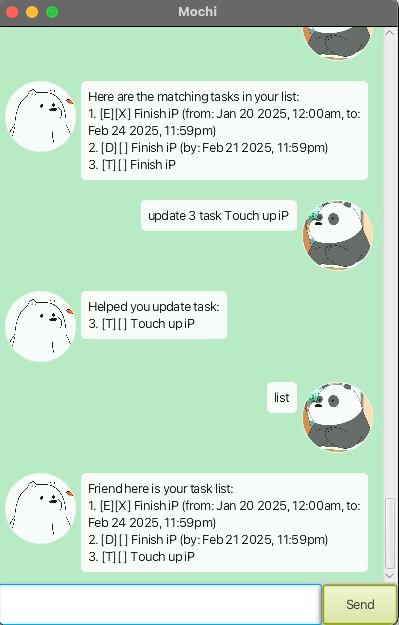
Update task
Modify an existing task.
Usage: update <task_index> <field> <new_value>
Example:
update 1 task Buy vegetables
Expected Output:
Helped you update task:
1. [T][ ] Buy vegetables
List
View all tasks in the list.
Usage: list
Example:
list
Expected Output:
Friend here is your task list:
1. [T][ ] Buy vegetables
2. [D][ ] Finish iP (by: Feb 21 2025 11:59pm)
Bye
Close the application.
Usage: bye
Example:
bye
Expected Output:
Bye. Hope to see you again soon!
Mochi will miss you!!!